> ## Documentation Index
> Fetch the complete documentation index at: https://paxos-0ac97319-jg-test-1.mintlify.site/llms.txt
> Use this file to discover all available pages before exploring further.
# Addresses
> View and manage addresses for transferring crypto off the Paxos platform.
export const value_2 = "add or delete crypto addresses"
export const value_1 = "view saved crypto addresses"
export const value_0 = "add or delete crypto addresses";
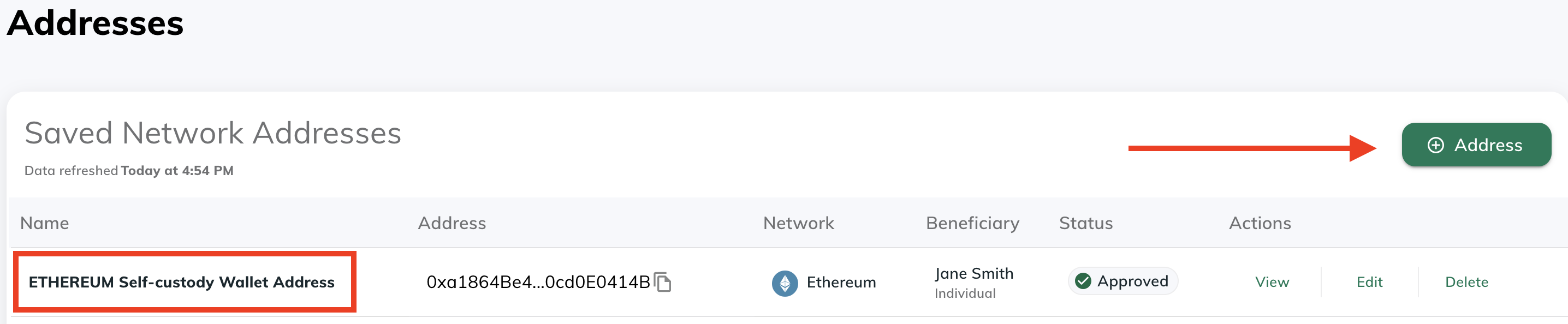
Use [Addresses](https://dashboard.paxos.com/dashboard/addresses) to review all the current destination wallet addresses that can be used to move digital assets off the Paxos platform.
For example, when [transferring a stablecoin to an external wallet](/guides/dashboard/transfer#transfer-to-an-external-wallet-or-bank-account), the options are populated from the addresses shown and configured here.
**Required Permissions**
You need a role with the {value_1} permission to perform this action.
To view a saved network address:
* Use the copy function in the **Address** column to quickly add an address to the clipboard.
* Use the **Actions** menu to view a saved address and review existing information, including the [beneficiary details](/guides/dashboard/travel-rule).
## Add Network Address
To add a new destination wallet address, go to [Addresses](https://dashboard.paxos.com/dashboard/addresses) and use **⊕︎ Address** to get started.
Once added, the address is available as an option when sending a digital asset to an external wallet (i.e., a crypto withdrawal).
**Required Permissions**
You need a role with the {value_0} permission to perform this action.
1. Provide a name and select the blockchain network.
2. Retrieve the external wallet address and paste it in the **Network Address** field.
**Off-platform Transfers**
**Network Addresses** are used to send crypto off the Paxos platform.
Ensure the address is correct before using it.
Assets sent to the wrong address may not be recoverable.
3. Provide beneficiary details for the recipient. Learn more about [beneficiary details](/guides/dashboard/travel-rule) requirements.
4. Save the address.
Only the name and beneficiary details of an address can be modified by clicking Edit; modifying other fields can be done by deleting and re-adding with modified information.
Optionally, perform a test [transfer](/guides/dashboard/transfer#transfer-to-an-external-wallet-or-bank-account) to ensure you can send assets to the destination wallet address.
## Delete Network Address
On the [Addresses](https://dashboard.paxos.com/dashboard/addresses) screen, use **Delete** in the **Actions** menu to permanently remove a saved network address.
Any future withdrawals to the address will fail unless you add the address again.
**Required Permissions**
You need a role with the {value_2} permission to perform this action.