> ## Documentation Index
> Fetch the complete documentation index at: https://paxos-0ac97319-jg-test-1.mintlify.site/llms.txt
> Use this file to discover all available pages before exploring further.
# Monitor Addresses
> Add your first monitoring address.
## What is a monitoring address?
A **monitoring address** is a blockchain address that Paxos monitors daily for eligible activity tied to the Global Dollar Network. We recommend adding any addresses you expect to hold, receive, or mint USDG as a monitoring address in order to receive rewards for all of your USDG on-chain activity.
Monitoring addresses must be added by month end (23:59 UTC+0) in order to earn rewards for that month. Addresses added after month end will start earning rewards for the following month.
## Add a monitoring address
1. Go to the **Rewards** tab in the Paxos Dashboard
2. Click **Add Monitoring Address**
3. Enter:
* Network
* Address
* (Optional) Nickname
4. Click **Submit**
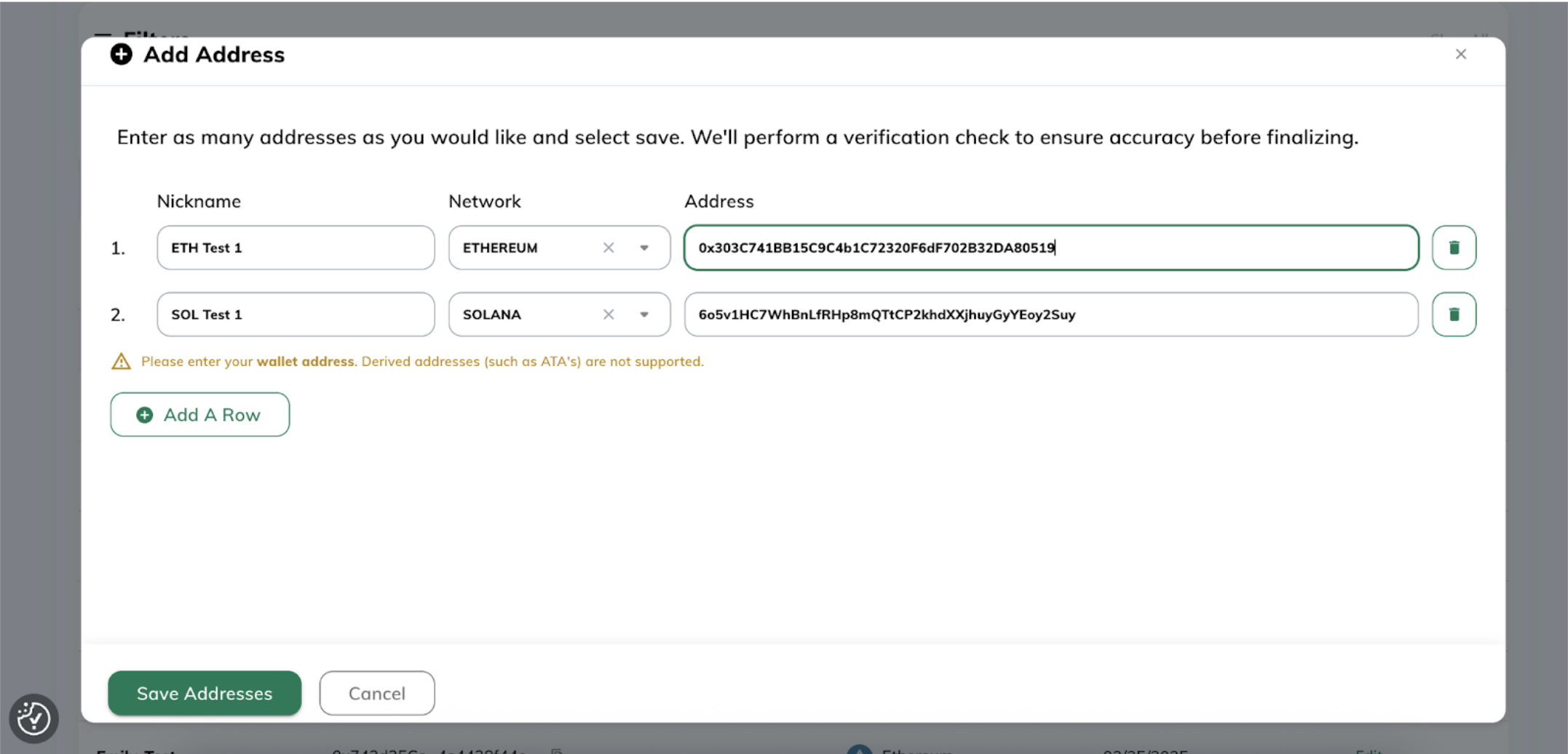
Once you submit monitoring addresses, Paxos will validate that the format of the address is valid for a chosen network. Invalid addresses will be individually flagged and must be resolved or removed before you can upload a batch of monitoring addresses.
Paxos validates addresses using the following address format standards:
* EVM: [https://ethereum.org/en/developers/docs/accounts/#account-creation](https://ethereum.org/en/developers/docs/accounts/#account-creation)
* Solana: [https://solana.com/docs/core/accounts#account](https://solana.com/docs/core/accounts#account)
For Solana, derived addresses (such as ATA’s) are NOT supported. Paxos derives the token accounts associated with your standard Solana wallet addresses. If you are a more advanced user and need support for derived addresses, please email [gdn-rewards@paxos.com](mailto:gdn-rewards@paxos.com).
## View monitoring addresses
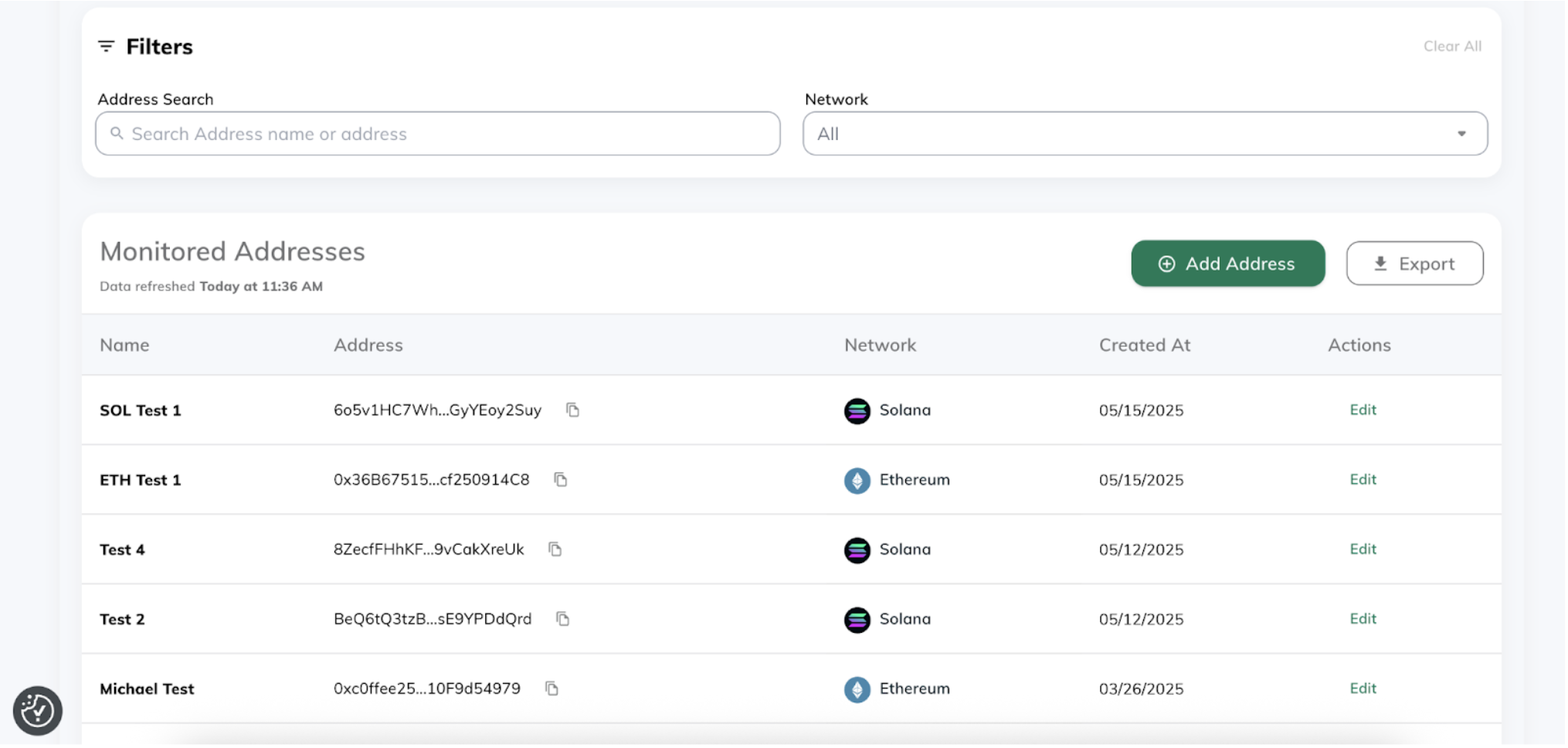
See your list of monitored addresses, including:
* Network
* Address
* Nickname (if provided)
* Date added
Additionally, you can search by nickname, the address itself, or filter by network. You can also export your list of addresses directly from the Dashboard by clicking our **Export** icon.
## Required Permissions
You need a role with the “update monitoring addresses” permission (i.e. Treasurer) to perform this action.
## FAQs
**What’s the difference between a monitoring address, a withdrawal address, and a payout address?**
A monitoring address is used by Paxos to determine how much your organization has earned in rewards by holding, minting, and accepting USDG on-chain.
A withdrawal address is an address your organization has registered with Paxos and can receive funds to on-chain from Paxos.
A payout address is designated withdrawal address where Paxos will pay out your USDG rewards
**Can I edit a monitoring address?**
You can edit the nickname. Network and address are permanent. If you need to change a monitoring address, simply add a new address via the steps above.
**Can I delete a monitoring address?**
No. If unused, a monitoring address will simply earn 0 rewards. For bookkeeping purposes, we plan to introduce the ability to “delete” a monitoring address later in 2025.
**When do I need to add monitoring addresses by?**
Before the last calendar day of the month at 23:59 UTC+0.
**How does Paxos validate if a monitoring address is valid?**
We validate addresses using standard address formatting conventions:
* EVM chains: [https://ethereum.org/en/developers/docs/accounts/#account-creation](https://ethereum.org/en/developers/docs/accounts/#account-creation)
* Solana: [https://solana.com/docs/core/accounts#account](https://solana.com/docs/core/accounts#account)