> ## Documentation Index
> Fetch the complete documentation index at: https://paxos-0ac97319-jg-test-1.mintlify.site/llms.txt
> Use this file to discover all available pages before exploring further.
# Periodic KYC Refresh
> Manage the periodic KYC refresh of an Identity on the Paxos Platform in an automated, compliant way.
To ensure that Paxos meets regulatory requirements, KYC information of end user identities that are directly onboarded
to Paxos must be periodically refreshed (every 1-3 years).
All customers that integrate with Paxos [Identity APIs](/api-reference/endpoints/identity) are subject to this process, and must integrate with the automated workflow outlined below to support it.
Paxos streamlines KYC Refresh using a webhook-based approach, which leverages [Paxos Webhooks](/guides/webhooks/quickstart), [Events API](/api-reference/events) and [Identity API](/api-reference/endpoints/identity).
A polling-based approach via [Identity API ](https://docs.paxos.com/api-reference/endpoints/identity/list-identities)will be available in late 2025, check back soon for more details.
## Webhook-based Approach
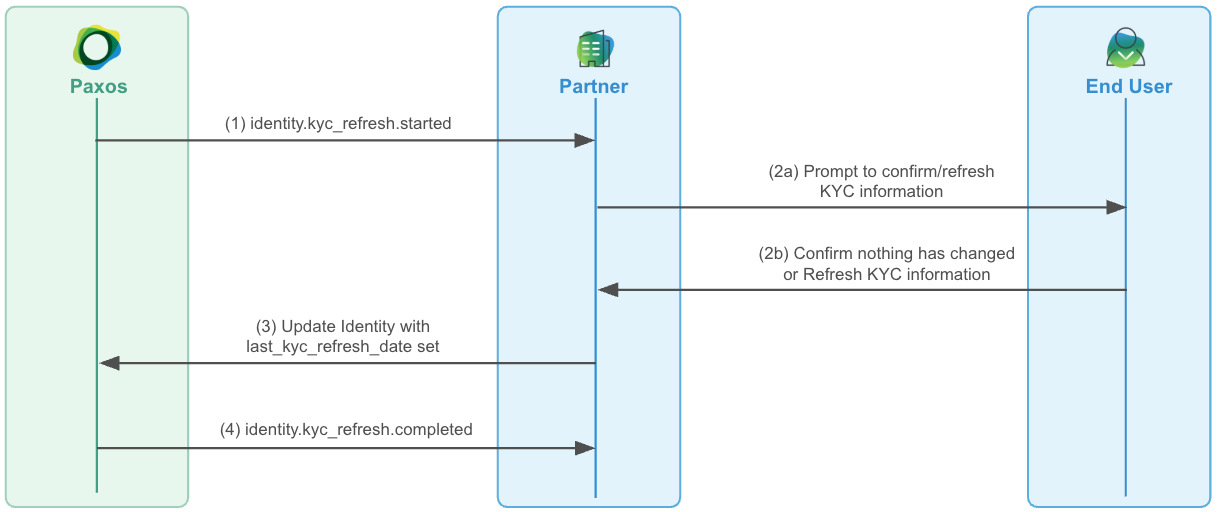 ### ➊ Consume KYC Refresh Events
Setup a [Webhook Consumer](/guides/webhooks/quickstart#consumer) to receive the following KYC refresh events for your end users:
* [`identity.kyc_refresh.started`](/api-reference/events/identity-kyc-refresh-object)
* [`identity.kyc_refresh.completed`](/api-reference/events/identity-kyc-refresh-object)
* [`identity.kyc_refresh.expired`](/api-reference/events/identity-kyc-refresh-object)
Use [Get Event](/api-reference/endpoints/events/get-event) to get additional information about the KYC refresh event (`last_kyc_refresh_date`, `next_kyc_refresh_date`, etc.).
### ➋ Prompt End User about Periodic Refresh
When an [`identity.kyc_refresh.started`](/api-reference/events) is received for your end user, prompt the user presenting their current KYC information indicating they should refresh their information if anything has changed, or continue without changes if everything is still accurate.
### ➌ Inform Paxos about the Refresh
When an end user indicates everything is still accurate, call [update-identity](/api-reference/endpoints/identity/update-identity) with the `identity_id` specified in the request, setting the `last_kyc_refresh_date` to the timestamp the user confirmed their information is still accurate.
If an end user refreshed their information, call [update-identity](/api-reference/endpoints/identity/update-identity) as specified above, but also include any changes the end user has made to their information.
Calling [update-identity](/api-reference/endpoints/identity/update-identity) with only `last_kyc_refresh_date` and no other changes is considered by Paxos to be confirmation no information has changed, therefore a completed KYC refresh. The next KYC refresh date will be updated accordingly (1-3 years from the provided `last_kyc_refresh_date`).
### ➍ Wait for Completion
Once KYC refresh is complete, a [`identity.kyc_refresh.completed`](/api-reference/events) will be received for the end user in question.
## Advanced
### Handling Expired Refreshes
If an [`identity.kyc_refresh.expired`](/api-reference/events) is received, it means Paxos did not receive an [update-identity](/api-reference/endpoints/identity/update-identity) request in the designated window to complete the KYC refresh process *(typically 30 days)*.
If this occurs, please **disable** the user by using use the `set_user_disabled` and setting it to `true` on the identity. If/when a user logs in to their account, they can update or confirm their details, and the `set_user_disabled`flag can be changed to `false`
If an identity has an expired KYC refresh, but remains active, Paxos could take administrative action to disable the user
### Refreshes in Compliance Review
In some cases, the Paxos compliance team might need to review the changes received from the end user as part of the
KYC refresh process.
In this case, the [`identity.kyc_refresh.completed`](/api-reference/events) event could experience a meaningful delay in being received.
### Backdating the Last KYC Refresh Date
If a historical record is known for the last KYC refresh dates of your end users **or** you've experienced an issue processing KYC refresh for an end-user then you can directly call [update-identity](/api-reference/endpoints/identity/update-identity) setting the `last_kyc_refresh_date` to the known date in the past, and Paxos will accept this as the date KYC refresh was performed for the end user.
Setting this date beyond the 1-3 year refresh period for an end user will cause an immediate [`identity.kyc_refresh.started`](/api-reference/events) to be triggered for the end user.
### ➊ Consume KYC Refresh Events
Setup a [Webhook Consumer](/guides/webhooks/quickstart#consumer) to receive the following KYC refresh events for your end users:
* [`identity.kyc_refresh.started`](/api-reference/events/identity-kyc-refresh-object)
* [`identity.kyc_refresh.completed`](/api-reference/events/identity-kyc-refresh-object)
* [`identity.kyc_refresh.expired`](/api-reference/events/identity-kyc-refresh-object)
Use [Get Event](/api-reference/endpoints/events/get-event) to get additional information about the KYC refresh event (`last_kyc_refresh_date`, `next_kyc_refresh_date`, etc.).
### ➋ Prompt End User about Periodic Refresh
When an [`identity.kyc_refresh.started`](/api-reference/events) is received for your end user, prompt the user presenting their current KYC information indicating they should refresh their information if anything has changed, or continue without changes if everything is still accurate.
### ➌ Inform Paxos about the Refresh
When an end user indicates everything is still accurate, call [update-identity](/api-reference/endpoints/identity/update-identity) with the `identity_id` specified in the request, setting the `last_kyc_refresh_date` to the timestamp the user confirmed their information is still accurate.
If an end user refreshed their information, call [update-identity](/api-reference/endpoints/identity/update-identity) as specified above, but also include any changes the end user has made to their information.
Calling [update-identity](/api-reference/endpoints/identity/update-identity) with only `last_kyc_refresh_date` and no other changes is considered by Paxos to be confirmation no information has changed, therefore a completed KYC refresh. The next KYC refresh date will be updated accordingly (1-3 years from the provided `last_kyc_refresh_date`).
### ➍ Wait for Completion
Once KYC refresh is complete, a [`identity.kyc_refresh.completed`](/api-reference/events) will be received for the end user in question.
## Advanced
### Handling Expired Refreshes
If an [`identity.kyc_refresh.expired`](/api-reference/events) is received, it means Paxos did not receive an [update-identity](/api-reference/endpoints/identity/update-identity) request in the designated window to complete the KYC refresh process *(typically 30 days)*.
If this occurs, please **disable** the user by using use the `set_user_disabled` and setting it to `true` on the identity. If/when a user logs in to their account, they can update or confirm their details, and the `set_user_disabled`flag can be changed to `false`
If an identity has an expired KYC refresh, but remains active, Paxos could take administrative action to disable the user
### Refreshes in Compliance Review
In some cases, the Paxos compliance team might need to review the changes received from the end user as part of the
KYC refresh process.
In this case, the [`identity.kyc_refresh.completed`](/api-reference/events) event could experience a meaningful delay in being received.
### Backdating the Last KYC Refresh Date
If a historical record is known for the last KYC refresh dates of your end users **or** you've experienced an issue processing KYC refresh for an end-user then you can directly call [update-identity](/api-reference/endpoints/identity/update-identity) setting the `last_kyc_refresh_date` to the known date in the past, and Paxos will accept this as the date KYC refresh was performed for the end user.
Setting this date beyond the 1-3 year refresh period for an end user will cause an immediate [`identity.kyc_refresh.started`](/api-reference/events) to be triggered for the end user.