> ## Documentation Index
> Fetch the complete documentation index at: https://paxos-0ac97319-jg-test-1.mintlify.site/llms.txt
> Use this file to discover all available pages before exploring further.
# Onboarding a Person for Crypto Brokerage
> Create an Identity, Account and Profile to provide Buy, Hold and Sell Crypto Brokerage for Users
This guide walks through setting up a [Fiat and Crypto Subledger](/guides/crypto-brokerage/ledger-type#fiat-and-crypto-subledger) crypto brokerage integration,
creating a Person [Identity](/api-reference/endpoints/identity) and a related [Account](/api-reference/endpoints/accounts) and [Profile](/api-reference/endpoints/profiles) to book orders using the [Order API](/api-reference/endpoints/orders). First, we will
create an [Identity](/api-reference/endpoints/identity) to represent the user's kyc information on the Paxos Platform. Then we will create an [Account](/api-reference/endpoints/accounts) which sets
up the structure of the brokerage account. Then we will create a [Profile](/api-reference/endpoints/profiles) that represents the users fiat and crypto asset holdings. Then we will integrate with the [Order](/api-reference/endpoints/orders) API to
set up a simple Buy, Hold and Sell integration. This guide should take around 30 minutes.
## Prerequisites
* Sign up to the [Paxos Dashboard](/guides/dashboard/account) in Sandbox
* Reach out to [Support](https://support.paxos.com) to provision access to the [Identity API](/api-reference/endpoints/identity)
## Authenticate in Sandbox
Create an [API Key](/guides/dashboard/admin/api) on the Sandbox [Paxos Dashboard](/guides/dashboard/account) with the following scopes to access the [Identity](/api-reference/endpoints/identity),
[Account](/api-reference/endpoints/accounts) and [Order](/api-reference/endpoints/orders) APIs needed for this guide
* `identity:read_identity`
* `identity:read_account`
* `identity:write_identity`
* `identity:write_account`
* `funding:read_profile`
* `funding:write_profile`
* `exchange:read_order`
* `exchange:write_order`
Run below to get the `access_token` from OAuth
```shell
curl --location 'https://oauth.sandbox.paxos.com/oauth2/token' \
--form grant_type=client_credentials \
--form client_id={paxos_client_id} \
--form client_secret={paxos_secret} \
--form scope='identity:read_identity identity:read_account identity:write_identity identity:write_account funding:read_profile funding:write_profile exchange:read_order exchange:write_order'
```
Confirm the response includes requisite scopes and save the `access_token` to use in the request authorization header
throughout this guide.
```json
{
"access_token": "{access_token}",
"expires_in": 3599,
"scope": "identity:read_identity identity:read_account identity:write_identity identity:write_account funding:read_profile funding:write_profile exchange:read_order exchange:write_order",
"token_type": "bearer"
}
```
Include the Authorization header with the bearer token on all API requests `-H "Authorization: Bearer $TOKEN"`.
## Creating a Person Identity and Account
### ➊ Creating an Identity with Passthrough Verification
To create a person identity, Paxos requires both
* The details of the person according to the [Person Required Details Grid](/guides/identity/required-details#required-person-details)
* Data on who has completed identity verification (IDV) of the person.
### Passthrough
Set `verifier_type` to `PASSTHROUGH` and then provide details about how and when IDV was conducted for this user by setting:
* `passthrough_verifier_type` - the company of the IDV provider
* `passthrough_verified_at` - when IDV was completed for the user
* `passthrough_verification_id` - external id for the IDV record in the IDV provider's system
* `passthrough_verification_status` - the current status of IDV, `APPROVED` if verified
* `passthrough_verification_fields` - the set of fields used to verify the user during IDV
All above attributes are required when `verifier_type` is set to `PASSTHROUGH`.
```shell
curl --location "https://api.sandbox.paxos.com/v2/identity/identities" \
--request "POST" \
--header "Authorization: Bearer {access_token}" \
--data '{
"ref_id": "{your_end_user_ref_id}",
"person_details": {
"verifier_type": "PASSTHROUGH",
"passthrough_verifier_type": "JUMIO",
"passthrough_verified_at": "2021-06-16T09:28:14Z",
"passthrough_verification_id": "775300ef-4edb-47b9-8ec4-f45fe3cbf41f",
"passthrough_verification_status": "APPROVED",
"passthrough_verification_fields": ["FULL_LEGAL_NAME", "DATE_OF_BIRTH"],
"first_name": "Billy",
"last_name": "Duncan",
"date_of_birth": "1960-01-01",
"address": {
"address1": "123 Main St",
"city": "New York",
"province": "NY",
"country": "USA",
"zip_code": "10001"
},
"nationality": "USA",
"cip_id": "073-05-1120",
"cip_id_type": "SSN",
"cip_id_country": "USA",
"phone_number": "+1 555 678 1234",
"email": "example@somemail.org"
},
"customer_due_diligence": {
"estimated_yearly_income": "INCOME_50K_TO_100K",
"expected_transfer_value": "TRANSFER_VALUE_25K_TO_50K",
"source_of_wealth": "EMPLOYMENT_INCOME",
"employment_status": "FULL_TIME",
"employment_industry_sector": "ARTS_ENTERTAINMENT_RECREATION"
}
}'
```
The `cip_id` of an [Identity](/api-reference/endpoints/identity) is required to be unique. If a `409 duplicate cip_id` error occurs,
handle it by either:
* Refusing to support crypto brokerage services for customers who have a duplicate `cip_id`
* If they are confirmed to be the same [Identity](/api-reference/endpoints/identity), create a new [Account](/api-reference/endpoints/accounts) to represent each user account.
Check the response to find the `identity_id` of the newly created [Identity](/api-reference/endpoints/identity) and notice the status of the [Identity](/api-reference/endpoints/identity) is `PENDING`.
Paxos will make an [Onboarding Decision](/guides/identity/statuses#onboarding-decision) and asynchronously update the status to either `DENIED` or `APPROVED`.
```json
{
"id": "{identity_id}",
"status": "PENDING",
"created_at": "2021-06-16T09:28:14Z",
"updated_at": "2021-06-16T09:28:14Z",
"ref_id": "{your_end_user_ref_id}",
"person_details": {
// ...
}
}
```
An [Identity](/api-reference/endpoints/identity) might stay in `PENDING` due to being deemed high risk by Paxos. This [Identity](/api-reference/endpoints/identity) will be
required to undergo [Enhanced Due Diligence](/guides/identity/edd). See [how to automate document collection](/guides/identity/edd) to
allow `HIGH` risk customers to onboard to Paxos.
### ➋ Wait for the Identity to be Approved
Using the above details should result in auto-approval of the [Identity](/api-reference/endpoints/identity). You can immediately call the [Get Identity](/api-reference/endpoints/identity/get-identity) endpoint
and see the `summary_status` is `APPROVED`.
```shell
curl --location "https://api.sandbox.paxos.com/v2/identity/identities/{identity_id}" \
--request "GET" \
--header "Authorization: Bearer {access_token}"
```
* If the [Identity](/api-reference/endpoints/identity) is stuck in `PENDING`, read the [Identity Status](/guides/identity/statuses) guide to help pinpoint why. If you have further questions, you can reach out to [Support](https://support.paxos.com).
* Use a [Webhook](/guides/webhooks) integration to asynchronously process [`identity.approved`](/api-reference/webhooks) and [`identity.denied`](/api-reference/webhooks)
events to notify users when they have been onboarded to Paxos.
### ➌ Creating an Account and Profile
Now we are ready to make an [Account](/api-reference/endpoints/accounts) and [Profile](/api-reference/endpoints/profiles) for the [Identity](/api-reference/endpoints/identity). An [Account](/api-reference/endpoints/accounts) logically relates to a user's brokerage account,
an [Identity](/api-reference/endpoints/identity) therefore can have one or many [Accounts](/api-reference/endpoints/accounts).
### Single Owner Account
The `create_profile` flag must be set to `true`, this will ensure a [Profile](/api-reference/endpoints/profiles) is created for the [Account](/api-reference/endpoints/accounts). This is how to
create accounts and profiles for a [Fiat and Crypto Subledger](/guides/crypto-brokerage/ledger-type#fiat-and-crypto-subledger) integration.
```shell
curl --location "https://api.sandbox.paxos.com/v2/identity/accounts" \
--request "POST" \
--header "Authorization: Bearer {access_token}" \
--data '{
"create_profile": true,
"account": {
"identity_id": "{identity_id}",
"ref_id": "{your_account_ref}",
"type": "BROKERAGE",
"description": "Brokerage account for Billy Duncan"
}
}'
```
### Joint Accounts
For accounts with more than one owner, for example a joint brokerage account, both owners are required to have an [Identity](/api-reference/endpoints/identity) created on the Paxos
Platform. An [Account](/api-reference/endpoints/accounts) and [Profile](/api-reference/endpoints/profiles) is then created for a designated primary account owner with any additional owners being set in `members` with the
`BENEFICIAL_OWNER` role.
[Identities](/api-reference/endpoints/identity) can be added or removed from an [Account](/api-reference/endpoints/accounts) after creation using the [Add Account Members](/api-reference/endpoints/account-members/add-account-members) and [Delete Account Member](/api-reference/endpoints/account-members/remove-account-member) endpoints respectively
```shell
curl --location "https://api.sandbox.paxos.com/v2/identity/accounts" \
--request "POST" \
--header "Authorization: Bearer {access_token}" \
--data '{
"create_profile": true,
"account": {
"identity_id": "{billy_duncan_identity_id}",
"ref_id": "{your_account_ref_id}",
"type": "BROKERAGE",
"description": "Brokerage account for Billy and Sarah Duncan",
"members": [{
"identity_id": "{sarah_duncan_identity_id}",
"roles": ["BENEFICIAL_OWNER"]
}]
}
}'
```
## Booking an Order
We will use the [Order](/api-reference/endpoints/orders) API to create buy and sell orders. We recommend also
taking a look at the [FIX](/guides/crypto-brokerage/fix) and [WebSocket](/api-reference/websockets/overview) solutions and using the best combination of APIs
for the specific use case.
### ➊ Fund the Account
In a complete integration, follow the [Fiat Transfers Funding Flow](/guides/developer/fiat-transfers/quickstart) guide to learn how to fund user assets using
a [Fiat Deposit](/api-reference/endpoints/fiat-transfers).
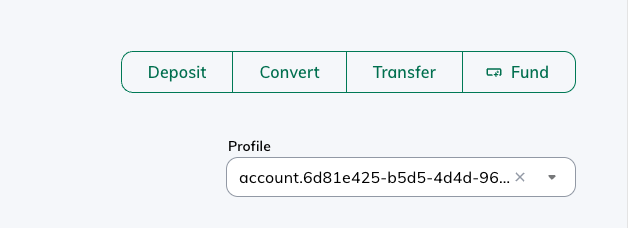
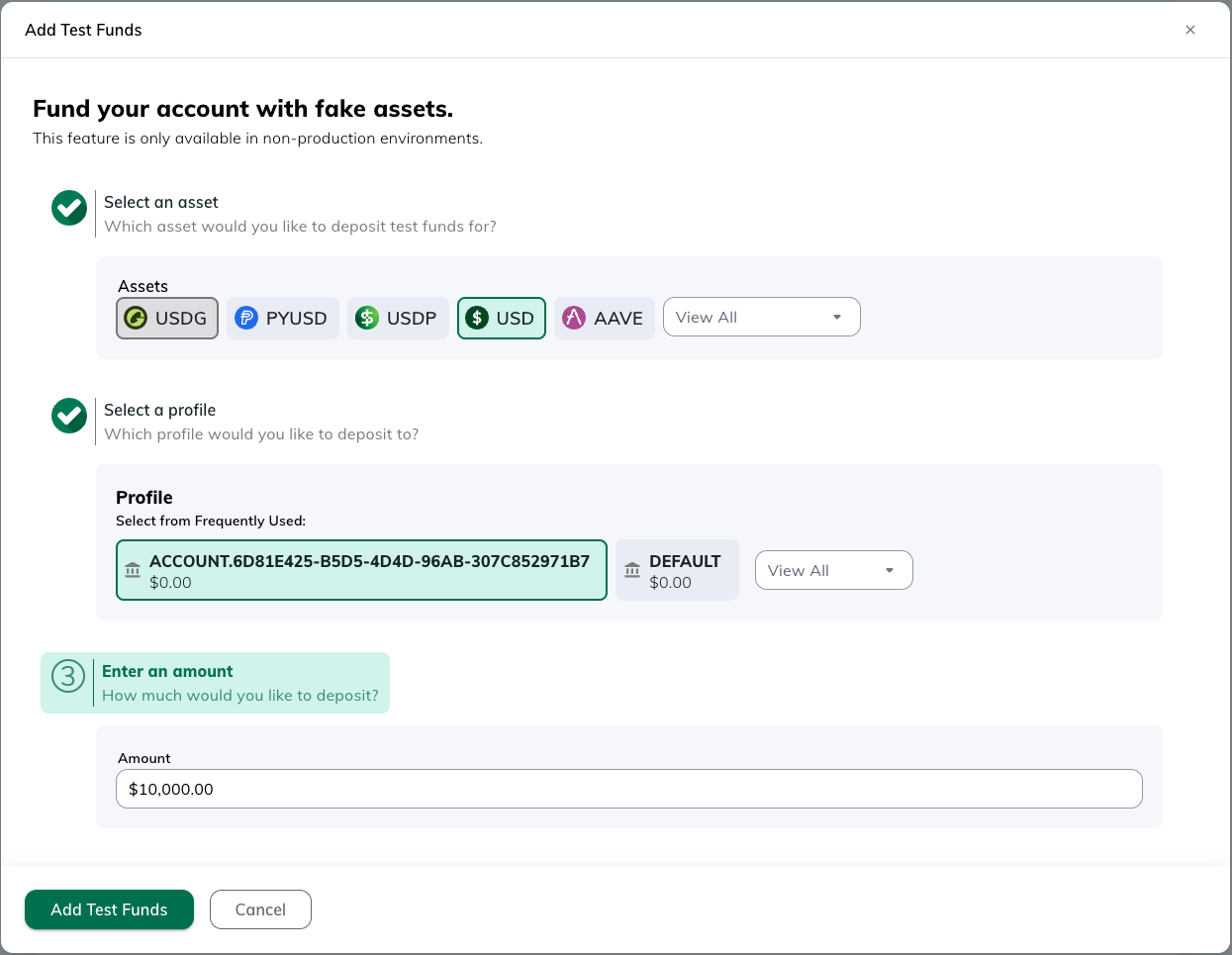
For this guide, we will use the sandbox-only Test Funds feature in [Dashboard](https://dashboard.sandbox.paxos.com/) to fund the [Identity](/api-reference/endpoints/identity) with \$10,000 USD. First,
navigate to the [Dashboard Landing Page](https://dashboard.sandbox.paxos.com/) and locate the `Fund` button
 Then select the [Profile](/api-reference/endpoints/profiles) related to the [Account](/api-reference/endpoints/accounts) created and fund for \$10,000 USD
 ### ➋ Creating a Order
To book an order, specify the `profile_id` which is linked to the `account_id` created above *`(if one
exists, else the omnibus profile_id)`*.
### Buy
```shell
curl --location "https://api.sandbox.paxos.com/v2/profiles/{profile_id}/orders" \
--request "POST" \
--header "Authorization: Bearer {access_token}" \
--data '{
"side": "BUY",
"market": "ETHUSD",
"type": "LIMIT",
"price": "1814.8",
"base_amount": "1",
"identity_id": "{identity_id}",
"identity_account_id": "{account_id}"
}'
```
### Sell
```shell
curl --location "https://api.sandbox.paxos.com/v2/profiles/{profile_id}/orders" \
--request "POST" \
--header "Authorization: Bearer {access_token}" \
--data '{
"side": "SELL",
"market": "ETHUSD",
"type": "LIMIT",
"price": "1804.2",
"base_amount": "1",
"identity_id": "{identity_id}",
"identity_account_id": "{account_id}"
}'
```
You can check the status of the order by calling
```shell
curl --location "https://api.sandbox.paxos.com/v2/profiles/{profile_id}/orders/{order_id}" \
--request "GET" \
--header "Authorization: Bearer {access_token}"
```
And that is it, congratulations on completing your first end-to-end crypto brokerage integration with Paxos!
### ➋ Creating a Order
To book an order, specify the `profile_id` which is linked to the `account_id` created above *`(if one
exists, else the omnibus profile_id)`*.
### Buy
```shell
curl --location "https://api.sandbox.paxos.com/v2/profiles/{profile_id}/orders" \
--request "POST" \
--header "Authorization: Bearer {access_token}" \
--data '{
"side": "BUY",
"market": "ETHUSD",
"type": "LIMIT",
"price": "1814.8",
"base_amount": "1",
"identity_id": "{identity_id}",
"identity_account_id": "{account_id}"
}'
```
### Sell
```shell
curl --location "https://api.sandbox.paxos.com/v2/profiles/{profile_id}/orders" \
--request "POST" \
--header "Authorization: Bearer {access_token}" \
--data '{
"side": "SELL",
"market": "ETHUSD",
"type": "LIMIT",
"price": "1804.2",
"base_amount": "1",
"identity_id": "{identity_id}",
"identity_account_id": "{account_id}"
}'
```
You can check the status of the order by calling
```shell
curl --location "https://api.sandbox.paxos.com/v2/profiles/{profile_id}/orders/{order_id}" \
--request "GET" \
--header "Authorization: Bearer {access_token}"
```
And that is it, congratulations on completing your first end-to-end crypto brokerage integration with Paxos!